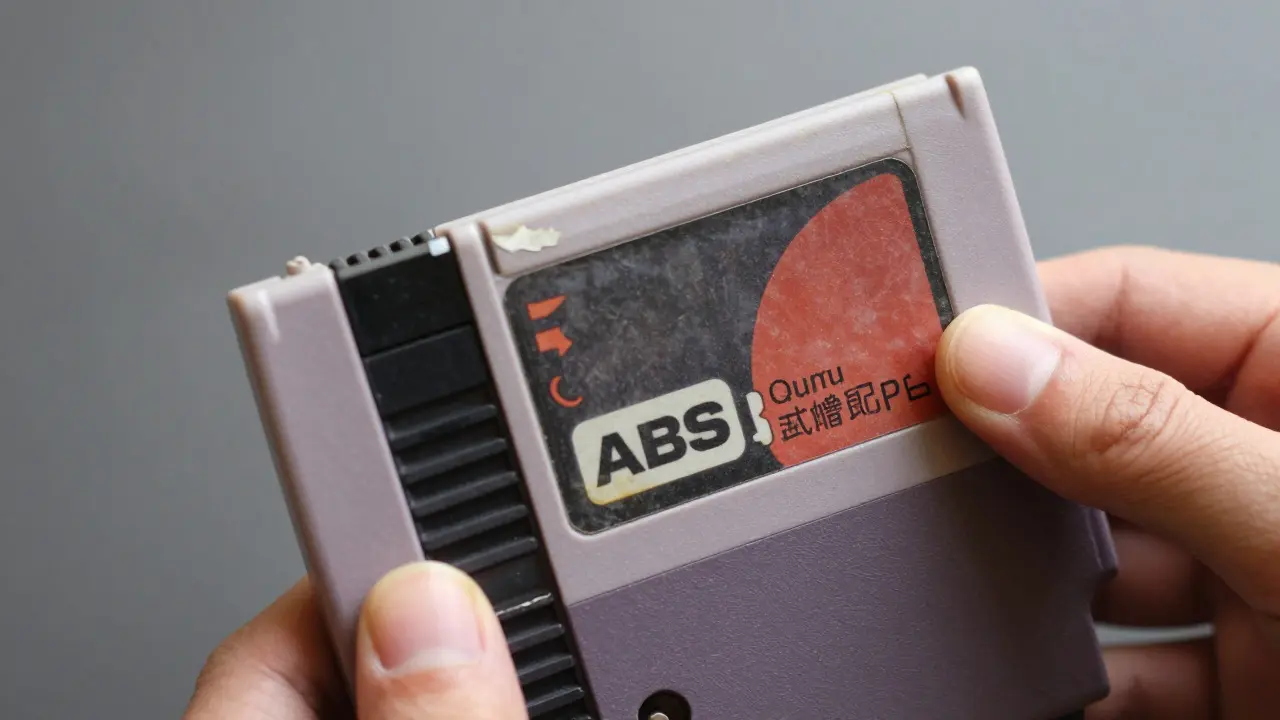
You click on a listing for a pristine copy of The Legend of Zelda at $45. The seller claims it is "mint condition." You pay, wait two weeks, and open the box to find a scratched cartridge, a faded label, and no manual. This scenario happens more often than you think. When buying retro video games online, the photo is your only window into the item's true state. If you know what to look for, you can spot red flags before they cost you money.
Evaluating these images isn't about being a pixel-peeper; it's about understanding how light, angle, and compression hide defects. Sellers aren't always malicious-sometimes they just don't realize that a shadow looks like a crack or that a glare hides a missing corner. Your job as a buyer is to read between the pixels.
Key Takeaways
- Check the label first: Look for fading, peeling, or water damage in high-resolution shots. A clean label usually indicates careful storage.
- Inspect the shell edges: Zoom in on the corners and seams. Cracks, stress marks, or discoloration here are common in older cartridges.
- Demand multiple angles: One photo is not enough. Ask for top, bottom, front, back, and side views to catch hidden defects.
- Verify the media type: For discs, look for ring wear. For cartridges, check for connector pin corrosion. These details determine playability.
- Trust but verify accessories: Manuals and boxes have different value drivers. A loose flap or torn page changes the price significantly.
Why Photo Quality Matters More Than Price
In the retro gaming market, condition drives value. A "complete-in-box" (CIB) copy of a rare title can be worth three times more than a loose cartridge. But "condition" is subjective unless defined by visual evidence. Many buyers focus on the price tag and ignore the image quality, assuming that if the seller listed it, it must be fine. This is a mistake.
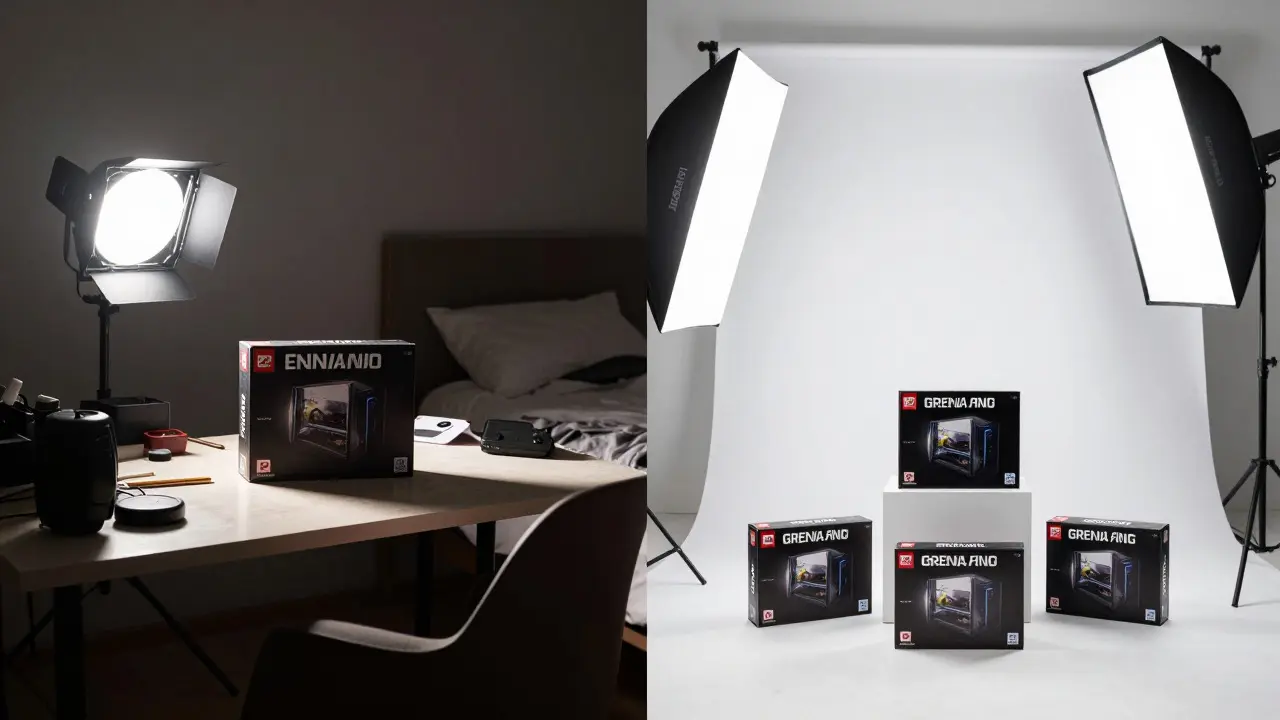
Low-resolution photos obscure small scratches and hairline cracks. Compressed JPEGs from phone cameras introduce artifacts that look like dust or scuffs. Natural lighting varies throughout the day, making color accuracy unreliable. When you evaluate a listing, you are essentially auditing the seller's honesty through their photography. A professional-grade photo setup suggests a serious collector who cares about preservation. A blurry, dark shot taken in a dim bedroom suggests a casual flipper who might not notice-or care about-minor damage.
Consider the difference between a $10 game and a $100 game. At lower price points, minor cosmetic flaws are acceptable. At higher price points, every scratch matters. Your evaluation criteria should scale with the investment. If you're spending over $50, treat the photo review like a forensic exam.
Analyzing Cartridge Photos: Shell and Label
For console games like NES, SNES, or Sega Genesis, the cartridge is the primary object of scrutiny. Start with the label. In the photo, look for:
- Fading: Does the text or artwork look washed out? Compare it to an official scan from a database like MobyGames. Significant fading lowers the grade.
- Peeling: Are the corners lifting? Even a tiny lift can spread over time. Check the edges closely.
- Water Damage: Look for wavy patterns or white residue around the edges of the sticker. This is a major red flag for internal corrosion.
Next, examine the plastic shell. Older ABS plastic yellows over time due to UV exposure. While some yellowing is normal for 30-year-old items, uneven yellowing suggests poor storage. Look for:
- Cracks: Especially near the release button or along the seams. Use your browser's zoom function to inspect these areas.
- Stress Marks: White lines inside the plastic where it has been bent. These indicate physical trauma.
- Discoloration: Dark spots or mold growth. Mold is rare but possible in humid climates.
If the photo shows the cartridge in a case, ask for a shot without the case. Cases can hide dents or cracks on the sides. A transparent case is better because it allows you to see the shell, but even then, reflections can obscure details.

Disc Games: Spotting Ring Wear and Scratches
PS1, PS2, and Xbox era games use optical discs, which are more fragile than cartridges. The most common defect is ring wear-micro-scratches that form concentric circles around the center hole. These are caused by improper handling or dirty laser lenses.
In a photo, ring wear is hard to see under direct flash because the light reflects off the shiny surface. To spot it, ask the seller to take a photo in natural, indirect light. Hold the disc at a slight angle so the light glances across the surface. If you see faint circular lines, the disc may still work, but its value drops. Deep scratches that break the reflective layer will cause the game to freeze or fail to load.
Also check the hub area. Is the center hole clean? Dust buildup there can interfere with the laser. For double-sided discs (like some Xbox titles), make sure both sides are photographed. A scratch on the second side is just as damaging as one on the first.
Accessories: Boxes, Manuals, and Inserts
A complete set includes the box, manual, and any inserts or stickers. Each component has its own grading criteria.
Box Condition
Look at the spine and corners. These areas suffer the most wear. A crisp spine indicates minimal shelf time. Creases, tears, or tape repairs reduce the grade. Check the flaps-are they attached? A missing flap is a significant deduction. Also, look for "box burn," which is a white halo effect around the edges caused by sunlight exposure over decades.
Manual and Insert
Open the manual in the photo if possible. Look for dog-ears (folded corners), missing pages, or writing in the margins. A blank page where a map or strategy section should be is a deal-breaker for many collectors. For inserts, check for holes or creases. These paper items are delicate and prone to tearing.
Sellers often forget to photograph the inside of the box. Ask for a shot showing the interior. Water stains or mildew inside the box suggest storage issues that might affect the game itself.
Red Flags in Seller Photography
Certain photographic choices signal potential problems. Here are the biggest red flags to watch for:
- Single Angle Only: If the seller only provides one front-facing photo, they are hiding something. Demand all sides.
- Heavy Flash Usage: Harsh flash creates glare that hides scratches and makes colors look unnatural. It also washes out fine details like micro-cracks.
- Busy Background: A cluttered background distracts from the item and can make it harder to spot defects. A plain white or gray background is standard for serious sellers.
- Zoomed-In Crop: If the photo is cropped tightly to avoid showing the edges, you won't see peeling labels or cracked corners.
- No Close-Ups: Without macro shots, you can't verify the condition of connectors, pins, or small text. Ask for close-ups of specific areas of concern.
Conversely, green flags include consistent lighting, neutral backgrounds, and multiple angles. Sellers who provide 8-10 photos per listing are usually more reliable. They understand that transparency builds trust.
Tools and Techniques for Better Evaluation
You don't need professional equipment to evaluate photos effectively. Use these techniques:
- Use Browser Zoom: Most browsers allow you to zoom up to 500%. Use this to inspect edges and corners. Look for inconsistencies in the texture of the plastic or paper.
- Compare with Reference Images: Search for official scans of the game's packaging. Compare the colors and layout. If the seller's photo looks different, it might be due to age, but it could also be a reprint or fake.
- Ask Specific Questions: Don't just ask "Is it good?" Ask "Are there any cracks on the left side?" or "Does the label peel at the bottom right?" Specific questions force the seller to look closely.
- Request Video: For high-value items, ask for a short video rotating the item. Motion reveals defects that static photos hide, such as deep scratches or flexing.
If you're buying from a platform like eBay or Mercari, use the built-in messaging system to keep a record of all requests and responses. If the seller refuses to provide additional photos, walk away. Transparency is non-negotiable.
Common Mistakes Buyers Make
Even experienced collectors fall into these traps:
- Assuming "Mint" Means Perfect: "Mint" is a marketing term, not a technical grade. Always rely on the photos, not the description.
- Ignoring Shipping Risks: A perfect game can arrive damaged if poorly packed. Check the seller's packing policy. Do they use bubble wrap? A sturdy box? Poor packing negates good condition.
- Buying on Emotion: If you love a game, you might overlook flaws. Step away for 24 hours before purchasing. Fresh eyes catch details that excitement misses.
- Trusting User Reviews Blindly: A seller with 99% positive feedback can still misrepresent an item. Read recent reviews specifically mentioning condition accuracy.
Remember, the goal is not to find a perfect item-it's to find an item that matches the description. If the photos show a scratch and the price reflects that, it's a fair deal. If the photos hide a scratch, it's a risk you shouldn't take.
What is the best way to check for ring wear on a disc?
Ask the seller to photograph the disc in natural, indirect light at a slight angle. Direct flash hides ring wear because it reflects off the surface. Glancing light reveals the micro-scratches that form concentric circles around the center hole.
How many photos should a seller provide for a retro game?
A minimum of six photos: front, back, left side, right side, top, and bottom. For complete-in-box sets, add photos of the box exterior, interior, manual, and insert. Serious sellers often provide eight to ten photos to ensure full transparency.
Does yellowing on a cartridge affect its value?
Yes, but it depends on the severity. Slight, even yellowing is normal for 30-year-old ABS plastic and has minimal impact. Uneven yellowing or heavy discoloration suggests poor storage and can reduce value by 10-20%. Collectors generally prefer cleaner shells for display purposes.
What should I do if the seller doesn't answer my photo requests?
Walk away. If a seller hesitates to provide additional photos, they likely know there is a defect they want to hide. Trust is essential in online transactions, and silence is a strong negative signal. There are always other listings available.
Are reprinted manuals worth less than originals?
Generally, yes. Original manuals from the late 1980s and early 1990s are rarer and more sought after. Reprints, often sold by third-party vendors, are cheaper but less valuable to serious collectors. Check the copyright date and paper quality to distinguish them. Originals usually have thicker, higher-quality paper.